What belongs on an insurance line of business page, section by section
The section order for an auto, home, BOP or workers comp page, where the quote form sits, how to link to carrier and town pages, and the mistakes that kill it.
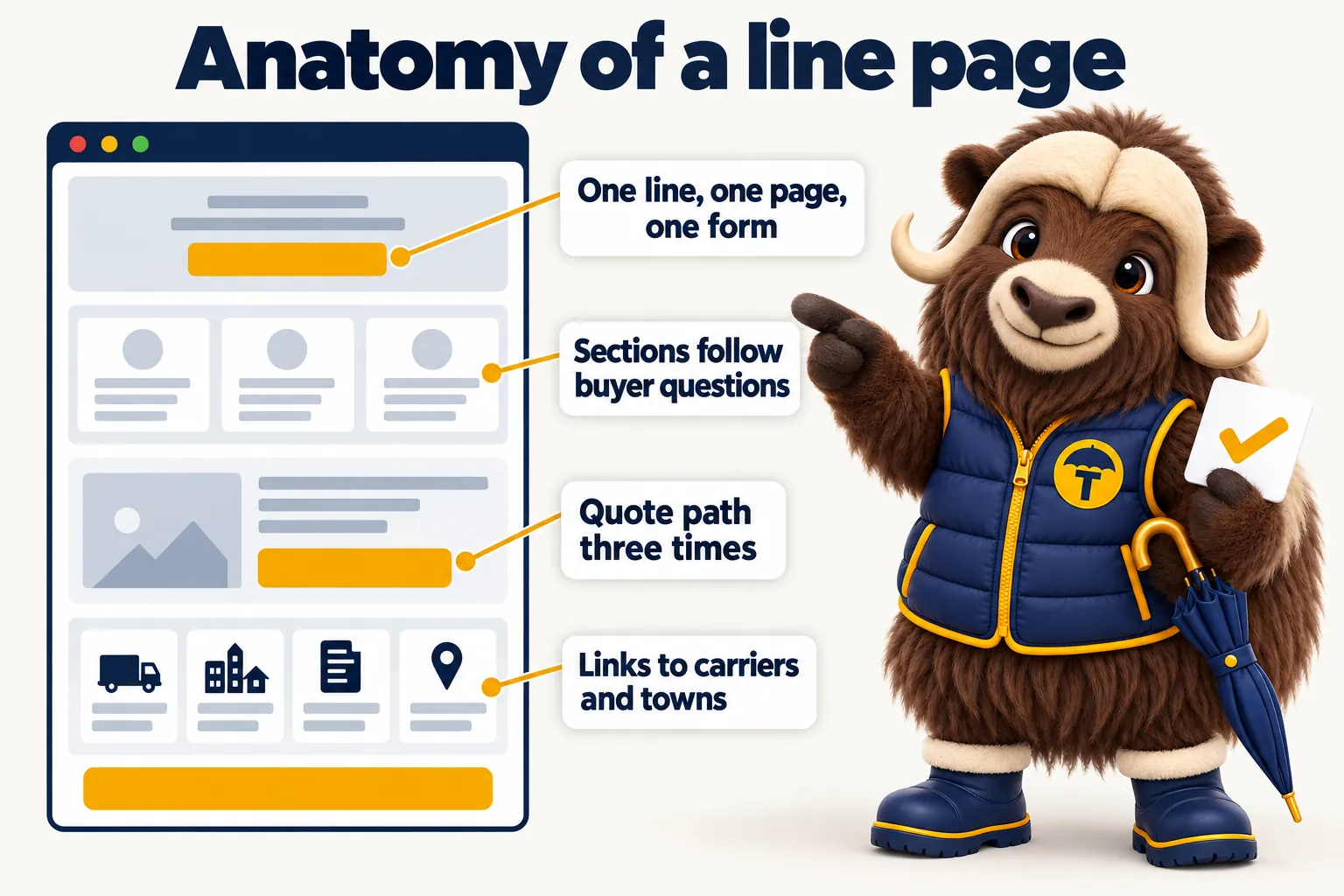
A line of business page has one job: answer the questions a buyer asks about that specific coverage, in the order they ask them, and then hand them a short quote form that is written for that line. Everything that belongs on the page serves that job, and everything that does not belong on the page is there because someone copied a competitor. This article walks the sections in order, says what each one answers, shows where the quote form sits, explains how the page should link to your carrier and town pages, and lists the mistakes that leave a line page ranking for nothing at all.
This article is general information about websites for insurance agencies. GetInsuranceWebsite is a website design and management company. We are not an insurance agency, broker, carrier or licensed producer, and nothing here is advice about coverage, rates or eligibility. What a line page says about coverage should be written or reviewed by your licensed staff, and every decision about what to quote or bind stays with them and with your carriers.
What a line of business page is actually for
A line of business page exists to convert a specific search into a specific quote request. Somebody typed a coverage name, usually with a town or a trade attached, because they have a decision to make and they want to know whether a local agency can help with it. The page has to answer that within a few seconds, give them enough to trust the answer, and then make the request easy. It is not a brochure section and it is not an article. It is the page where the agency’s appointments, the buyer’s need and the quote form meet.
That framing settles most of the arguments about what goes on the page. If a section helps the buyer decide whether to request a quote from you, it belongs. If it is there because the competitor has it, or because someone thought the page looked thin, it does not. Google’s own guidance on helpful, people-first content says the same thing in different words: write for the person who arrived, not for the crawler that indexed it.
One line, one page, one form
Every line the agency writes gets its own page, its own headline, and its own form. A combined page is always a compromise, and the compromise always lands on the buyer. A personal auto shopper and a homeowners shopper are sometimes the same person, but they are asking different questions in different moments, and a page that tries to serve both ends up serving neither. On the commercial side it is worse. A restaurant owner looking for a business owners policy and a roofing contractor looking for workers compensation have almost nothing in common except that they both run a business.
The practical effect of splitting is that every page gets shorter and more specific, every form gets shorter, and every request arrives already tagged with its line. That tagging is what makes routing and reporting possible later, which is the subject of our piece on connecting the site to the agency management system. It is also what lets the features on a site do their work: a page per line, a form per line, and a request that lands where the producer for that line already works.
The page is not a coverage encyclopedia
Explaining the coverage is the smallest part of the page, not the largest. Every carrier, every comparison site and every consumer guide has already published a general definition of homeowners insurance, and republishing it in your own words earns nothing. What only your agency can write is the part that comes after the definition: which carriers you place the line with, which risks in your area come up over and over, what a first conversation with your producer sounds like, and what you need from the buyer to get started. Write that part at length and keep the definition short.
Keep the coverage language general throughout. A line page describes what a coverage typically does in the way a producer would describe it in a first conversation. It never tells a specific reader what limits to buy, never promises what a carrier will pay, and never implies the page itself has evaluated their situation. Say so plainly on the page. Buyers do not find that disclaimer off-putting; they find it honest.
The sections in order, and what each one answers
Here is the order that works, with the question each section answers. Treat it as a template you fill with real specifics, not a template you spin.
1. Headline and answer-first opening
The headline names the line and, where it makes sense, the place. “Workers compensation insurance for Ohio contractors” tells the visitor in one line that they are in the right place. The opening paragraph directly underneath answers the question the headline raises: who this coverage is for, what it generally does, and that this agency writes it. No warm-up, no “in an unpredictable world”, no history of the agency. The first sentence under the headline answers the headline.
This matters more on a phone than anywhere else. Reading research from the Nielsen Norman Group has long shown that people scan a page in a rough F shape, taking the first line or two seriously and skimming the rest, which means whatever you put in the first two lines is most of what gets read. Put the answer there.
2. The quote request path
The request path comes immediately after the opening, before any explanation. A meaningful share of visitors arrived already decided, usually because they were referred or because they have shopped this line before, and making them scroll past the education to find the form is a tax on the easiest conversions on the page. On desktop this can be the form itself in a right column. On mobile it is usually a prominent button that jumps to the form further down, plus a persistent way to call the office.
The form is the short one written for this line. It asks only what a producer needs to open a quote with a carrier, and it carries hidden fields for the line and the source page so the request arrives already labelled.
3. Who this coverage is for
This section answers “is this me?” in concrete terms. For a business owners policy that means naming the kinds of businesses that typically buy one: the retail shop, the small office, the restaurant, the contractor with a van and a storefront. For umbrella it means describing the household situation that usually prompts the question. Use the language buyers use about themselves, not the classification language the carrier uses about them. The buyer does not know their class code and should not have to.
4. What this coverage generally does
Here is the short, general explanation of the coverage, written as a producer would say it out loud. Keep it to the parts that matter to the decision. Structure it as a few plain bullets rather than a wall of text, because this is the section people scan. Say explicitly that the actual terms live in the policy and that limits and eligibility depend on the carrier, the state and the risk.
5. What it does not do that people assume it does
This is the section almost no agency writes, and it is the one that earns the most trust. Every line has a handful of common misunderstandings, and a producer who has quoted that line for a year can list them without thinking. Naming them on the page does three things at once: it proves the agency knows the line, it saves the producer the same conversation on every call, and it produces better-qualified requests because the person who submits has already adjusted their expectations.
6. What to have ready before you request a quote
This section answers “what will you ask me for?” and it is the quiet workhorse of the page. List the handful of things that unblock a quote for this line, in the order a producer would ask for them. It lowers the anxiety of starting, it shortens the back and forth after the request, and it sets up the form beneath it, because the visitor now understands why the form is short and where the rest of the questions will come from.
7. How the agency handles the request
Answer “what happens after I hit submit?” in specifics. Who reads the request, how fast a person replies, whether the first contact is a call or an email, and what the buyer will be asked for next. Be honest about the timeline your staffing can actually hold. A promise of a same working day reply that the agency keeps is worth far more than an instant quote promise the site cannot deliver, and it starts the relationship without a broken expectation.
8. Carriers you place this line with
Name the carriers you are appointed with for this line and link to each carrier page. This is the section that proves the agency is a real independent with real appointments, and it catches the substantial number of searches that pair a carrier name with a line or a town. Keep the descriptions general: which lines you place with them, the kinds of risks they tend to fit, and how claims and billing work. Do not reproduce their marketing copy and never quote rates on their behalf.
9. Related lines people bundle
Answer “what else should I be asking about?” with links to the lines that genuinely pair with this one. Auto links to home and umbrella. Home links to auto, umbrella and flood if you write it. General liability links to business owners policy, commercial auto and workers comp. This section serves the reader and quietly raises the average size of the accounts you write, because a buyer who understands the bundle asks for it.
10. Questions buyers actually ask
Put a genuine question and answer section near the end, built from the questions your producers are asked on the phone about this line. Write the answers so each stands alone, because they will be read out of context, both by a scanning visitor and by a search engine that lifts them into a result. Do not invent questions to hit a count, and do not copy them from another site. Six real questions are worth more than fifteen manufactured ones.
11. The towns you serve for this line
Close the body with links to the town pages where this line matters most, written as a sentence rather than a footer of links. This is the join between your line pages and your local pages, and it is how a small agency competes with a directory. The town page carries the local detail; the line page carries the coverage detail; the link is what lets a search engine see that both belong to one agency serving a real place.
12. The form again
End the page with the same quote form. The visitor who read to the bottom is the most convinced person on the page, and asking them to scroll back up is a needless loss.
Where the quote form sits, precisely
The form appears near the top, again in the middle, and again at the end, and it is the same form every time. The top instance catches the decided visitor, the middle instance catches the visitor at the moment the page has finished making its case, usually right after the “what to have ready” section, and the bottom instance catches the thorough reader. A persistent header button on every page of the site gives a fourth path for anyone who decides in the middle of a paragraph.
Two rules keep this from becoming clutter. First, it is one form definition rendered in several places, not three different forms, so the fields, the validation, the hidden line field and the destination all stay identical and reporting stays clean. Second, on mobile it is one column with large touch targets, the right keyboard per field, and no field that requires digging out a document. A form that demands a policy number or a vehicle identification number on a phone is a form that gets abandoned.
Page speed belongs in this conversation too, because a form nobody waited for is a form nobody filled in. The Core Web Vitals guidance from web.dev is the practical reference for what fast means, and it is why we hold every build to a 90+ PageSpeed target rather than treating speed as a nice-to-have.
Writing the page for different kinds of lines
The section order stays the same across lines. What changes is the weight each section carries and the vocabulary the page uses.
Personal lines
Personal lines pages are short, plain and fast, because the buyer is usually comparing on a phone and has done this before. Auto, home, renters and umbrella pages should spend most of their words on “who it is for”, “what to have ready” and “what happens next”, and very few on the coverage definition. The bundle section does real work here, because a personal lines buyer who came for auto often leaves with a home quote request as well. The personal lines agency page describes how we set these up as a set rather than one at a time.
Commercial lines
Commercial pages carry more weight in the sections that prove you understand the trade. A workers compensation page that names the classes of business you write most of, describes how the audit works in general terms, and explains what a producer will ask for is doing something no carrier page does. The same is true of a general liability page that speaks to contractors specifically, or a commercial auto page that distinguishes a couple of vans from a real fleet. The buyer is judging whether you have seen their kind of business before, and the page is the only evidence they have. Our commercial lines agency page goes further into how the commercial set is usually organized.
Life, health, Medicare and benefits
These pages are written with more care about wording than any others, because the regulatory expectations around how they are marketed are stricter and the buyer is more cautious. Keep the general explanation short, be explicit that the page is information rather than advice, avoid anything that reads like a recommendation for a specific reader, and have your compliance adviser review the copy before it goes live. The request path here is often a conversation request rather than a quote form, and the page should say so. What the buyer needs most from these pages is a clear sense of what the first conversation will be like and that nothing is being sold to them on the page itself.
Internal linking that actually does something
Internal links on a line page are structure, not decoration. They tell a search engine which pages belong together and they move a reader to the next page they need. Google’s documentation on making links crawlable is blunt about the mechanics: a link has to be a real anchor tag with an href that a crawler can follow, and the anchor text is a signal about the destination.
The three link directions from a line page
A healthy line page links in three directions. Out to the carrier pages for the carriers you place that line with. Out to the town pages where you write the most of it. Out to the related lines people bundle with it. That is usually somewhere between five and a dozen links in the body of the page, placed where a reader would want them, not stacked in a block at the bottom.
Links back in
The links have to run both ways or the structure does not exist. Every carrier page lists the lines you place with that carrier and links to each line page. Every town page lists the lines that matter in that town and links to each line page. The services listing and the agency types pages point into the relevant line pages too. A line page that nothing links to is an orphan, and orphans get crawled late, ranked poorly and forgotten by the agency that wrote them.
Anchor text
Write anchor text the way you would say it in a sentence. “Our workers compensation page” or “workers compensation for contractors” both work. “Click here” wastes the signal and “best cheap workers comp insurance quotes online” reads like spam to a human being, which is the better test. If the anchor text would sound strange read aloud in the office, change it.
The mistakes that make a line page rank for nothing
Most line pages fail for a short list of reasons, and almost all of them are fixable without writing a word of new coverage copy.
It is a definition anyone could have written. If the page would be equally true with a different agency’s logo on it, it has nothing to rank on and nothing to link to. The fix is specifics: your carriers, your towns, your producers, your process, the questions your phone actually rings with.
One template spun into thirty pages. Near-identical pages with the line name swapped are the classic doorway pattern, and Google’s spam policies name that behaviour directly. The fix is fewer pages, each genuinely written.
No quote path on the page. A surprising number of line pages send the visitor to a single site-wide contact page, which loses the line, loses the context and loses a share of the visitors on the way. Put the form on the page.
The form is buried at the bottom. The decided visitor should not have to read the page to find the form. Put a path near the top.
The headline uses carrier vocabulary. A page headlined with a coverage form number or an internal classification term will not match what anyone types or how anyone thinks. Write the headline in the buyer’s words.
All the commercial lines share a page. This is the single most common structural mistake on independent agency sites. Split it.
The page is an orphan. Nothing links to it, so nothing finds it. Wire it into the carrier, town and related-line pages both ways.
It promises an instant quote. If the site routes the request to a producer, saying “instant quote” starts the relationship with a broken promise and produces requests from people expecting a number in thirty seconds. “Request a quote” is accurate and converts fine.
It loads slowly. A heavy hero image, a chat widget, a tracking stack and a slider will beat any copy improvement you make. Speed is a page structure decision as much as a technical one.
Nobody at the agency read it. The coverage copy on a line page should be reviewed by a licensed producer at the agency before it goes live, both because it is the right thing to do and because the producer will immediately spot the two sentences that would cause a bad conversation.
How to tell whether the page is working
Judge a line page by the quote requests it produces, not by its position in a ranking tool. The number you care about is requests from that page, by line, month over month, and then how many of those reached a delivered quote. A page that ranks well and produces nothing is either attracting the wrong search or failing at the form. A page that ranks modestly and produces steady requests is doing its job and deserves more internal links, not a rewrite.
Watch four things per page. How many people arrive. How many start the form. How many finish it. How many of those requests turned into a quote a producer actually delivered. If arrivals are low, the problem is the search the page targets or the links pointing at it. If starts are low, the problem is the opening or the position of the form. If finishes are low, the problem is the form. If quotes are low, the problem is either the qualification the page does or the follow-up process behind it, and a good look at your own numbers will usually tell you which.
Where to start
Start with the line that brings the agency the most revenue, write that page properly, and put the form on it before you write a second page. Then do the next line, and the next, until every line you write has a page. Only then add carrier pages, then town pages, then the links between all three. Building in that order means the first page you finish is already earning while the rest is being written.
If you would rather not assemble this yourself, that sequence is exactly how we build an agency site: a page and a form per line, a page per carrier, a page per town, and every request pushed into your own system. The plans include the weekly updates that keep the line list, the carriers and the team current after launch, and you can book a demo to see a line page built for your kind of agency before you commit to anything.
Sources
Frequently asked questions
What sections should an insurance line of business page have, and in what order?
Lead with a headline that names the line and the place, then an answer-first opening paragraph that says who the coverage is for and what it generally does. Put the quote request path immediately after that, then the sections that answer the buyer's real questions in the order they ask them: who needs this line, what it generally covers, what people wrongly assume it covers, what to have ready before requesting a quote, and how the agency handles the request once it arrives. Close with the carriers you place the line with, the related lines people bundle with it, the questions buyers actually ask, the towns you serve, and the form again. The order matters because a visitor reads top down and leaves the moment the page stops answering them.
Should the quote form be at the top or the bottom of a line of business page?
Both, and in the middle as well. A visitor who arrived already decided should not have to scroll past two thousand words to find the form, so the request path belongs near the top, either as the form itself or as a button that jumps to it. A visitor who needed convincing should find the form again at the point where the page has finished convincing them, usually after the section on what to have ready. A third instance at the end catches the people who read everything. It is the same form each time, with the same hidden field recording the line and the source page, so reporting stays clean no matter which one they used.
How long should a line of business page be?
Long enough to answer the questions a producer hears on the first call about that line, and no longer. That usually means more words for a commercial line, where the buyer is deciding whether the agency understands their trade at all, and fewer for a renters page, where the buyer mostly wants to know the agency writes it and how fast they can get a certificate for the landlord. Word count is not the target. A page that answers six real questions well will outperform a page that pads a coverage definition to three thousand words, and it will produce better quote requests because the person arriving at the form already understands what they are asking for.
Should an agency write a separate page for every commercial line?
Yes, for every line the agency actually writes and wants more of. General liability, business owners policy, commercial auto, workers compensation, commercial property, professional liability and cyber are separate purchases with separate buyers and separate questions, and a single commercial insurance page cannot answer any of them properly. The test is whether you can write a page that says something specific and true about how your agency handles that line. If you cannot, either you do not write enough of it to deserve a page or you need to talk to the producer who does before you write it.
Why does a line of business page rank for nothing?
Most often because it is a coverage encyclopedia entry with an agency logo on it. If the page says what homeowners insurance is in the same general terms as every carrier and comparison site, there is nothing on it that only this agency could have written, no reason for anyone to link to it, and nothing that answers the local, specific question the searcher actually typed. The other common causes are a page with no internal links pointing at it, a page that is one of thirty near-identical templates with only the line name swapped, a page with no quote path on it at all, and a page that loads slowly enough that the visitor gives up before it renders.
How should a line of business page link to carrier and town pages?
Link out to the carrier pages for the carriers you place that line with, to the town pages for the places where you write the most of it, and to the related lines a buyer would naturally bundle. Use plain descriptive anchor text that says what the reader will find, not a bare "click here" and not a keyword string nobody would say out loud. Keep the links inside the body copy where they help the reader rather than in a block of dozens at the bottom, and make sure the linking runs both ways, so the carrier and town pages point back at the line pages too. That mutual linking is what tells a search engine these pages belong to one real agency rather than a pile of templates.
Want a site like the one described here? Book a demo with GetInsuranceWebsite.